


1
/
of
4
SOLUTION ARE US!
Plustek Large Format Document Scanner S30 - Wide Format Tabloid, Ledger, A3 | Sc
Plustek Large Format Document Scanner S30 - Wide Format Tabloid, Ledger, A3 | Sc
Regular price
$629.10 USD
Regular price
Sale price
$629.10 USD
Quantity
Couldn't load pickup availability
Store New Arrivals Add to Favorite View Feedback Contact Plustek Large Format Document Scanner S30 - Wide Format Tabloid, Ledger, A3 | Scans Wide up to 12" and Long up to 200", 100-Sheet Duplex Auto Document Feeder Description
Scanner Type
Document
Connection Type
USB
Resolution
600 dpi
Wattage
18 watts
Color Depth
600 bpp
Standard Sheet Capacity
100
Optical Sensor Technology
CIS
Light Source Type
LED
Media Type
ID Card, Paper, Photo, Receipt
Item Dimensions D x W x H
12"D x 16"W x 11"H
Brand
plustek
Model Name
S30
Unit Count
1 Count
Manufacturer
Plustek
Warranty Description
1
Minimum System Requirements
Windows 7
Connectivity Technology
USB
Product Dimensions
12"D x 16"W x 11"H
Product description
Scan Batch of Files
40 Pages Per Minutes 100-page, 40ppm / 80ipm (Color mode, 200 dpi, A4 Landscape)
Productivity
Save ALL Scan settings in ONE Scan Profile Bundled software automates the file archiving process. Save settings & saving location as a shortcut
1 Speed & ADF 2 Batch Scan 100 Pages 3 Applicable Scan Size 4 File Archiving Automation
Multi-page PDF Quickly save your files as one Multi-page PDF, also convert files into editable & searchable.
1 Barcode Recognition 2 All Pages In 1 File 3 Image Processing 4 Full Text Search 5 Smart Clipboard
1D & 2D Barcode Type
Using barcode to accelerate workflow Built-in barcode recognition, including EAN-8/EAN-13, CODE39/93/128, QR Code, PDF-417 and more !
1 Special Storage Design 2 Support Various Barcode 3 Support Long Paper
BUILT-IN OCR
Plustekintegrates OCR technology that recognizes the text in your documents and generate editable files automatically after scanning.
Apart from the great performance of document digitization, S30 iscapable of convert files from paper-based into Excel, Word or searchable PDF format.
What happens if I have trouble with my S30 scanner
If you need help with any issue or question, click the chat windows at the bottom right corner to contact our engineer. You can leave your contact information & question if we're not online. We also provide tips & tricks to maximize S30 utilization.
What is the acceptable paper size of S30?
The acceptable paper size is up to 11.69 x 200 "
Can I scan & save a different batch of documents in one PDF file?
Yes.
How can I install S30 driver & software without CD-ROM?
Please download installation package from our official website.
Can I remove blank sheet when I scan a batch of double-sided documents?
Yes. this feature will be enabled default. If you accidently unable this function, please right click the scan profile >>Scan >> Select "Remove Blank Page" on the right hand side.
Where I can find help for Plustek SmartOffice S30?
If you need help with any issue or question, click the chat windows at the bottom right corner to contact our engineer.
[Office-friendly] - The S30 can scan documents up to 12 inches wide, meeting a wide range of business needs. A fast, powerful, large-format desktop scanner ideal for high-volume office use. [Cost Savings] - The S30 can scan A4/Letter size and 12" wide documents at the same time, so you won’t have to spend extra on a separate scanner just for a few wide-format documents. [Flexible Paper Handling] - The S30 handles a wide range of documents, from standard office paper in various sizes to blueprints, architectural plans, and engineering drawings, as well as thin papers like purchase orders and delivery notes. [Broad Compatibility] - Horizontal mode suit for matrix printer paper, thin or fragile documents can use carrier sheet protect during scanning. larger than Tabloid but smaller than Cut Sheet size, fold in carrier sheet and scan to save as a single image [Job Button] - The included software lets you register frequently used scanning tasks to the job button on the scanner. Once set up, you can simply press the job button to perform one-touch scanning. [Automatic Pape
Materials
Materials
Shipping & Returns
Shipping & Returns
Dimensions
Dimensions
Care Instructions
Care Instructions
Share


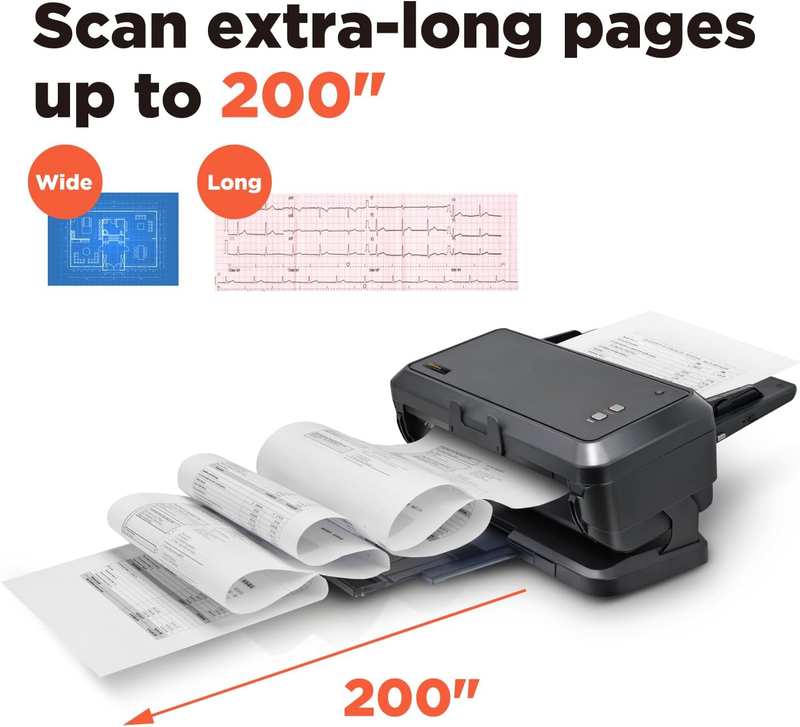
Image with text
Pair text with an image to focus on your chosen product, collection, or blog post. Add details on availability, style, or even provide a review.
-
Free Shipping
Pair text with an image to focus on your chosen product, collection, or blog post. Add details on availability, style, or even provide a review.
-
Hassle-Free Exchanges
Pair text with an image to focus on your chosen product, collection, or blog post. Add details on availability, style, or even provide a review.